# Openclash 设置

### **一、 订阅** <a href="#e4-b8-80-e3-80-81-e8-ae-a2-e9-98-85" id="e4-b8-80-e3-80-81-e8-ae-a2-e9-98-85"></a>

<mark style="color:red;">**自行修改配置文件或者使用第三方转换过的订阅配置有可能导致断网、不稳定、流媒体解锁失效等问题，请使用官网提供的原版订阅。**</mark>

1\. 复制订阅连接

<figure><img src="https://2331855688-files.gitbook.io/~/files/v0/b/gitbook-x-prod.appspot.com/o/spaces%2FO2AC57rbUFc12ou3APLo%2Fuploads%2FKcdgiLxVLq8WdOZ3d76D%2FSnipaste_2026-01-11_20-47-27.png?alt=media&#x26;token=e5da5f6c-a518-43ba-95ed-6a3002bb3b6d" alt=""><figcaption></figcaption></figure>

2\. 打开 openclash，配置文件订阅

<figure><img src="https://2331855688-files.gitbook.io/~/files/v0/b/gitbook-x-prod.appspot.com/o/spaces%2FO2AC57rbUFc12ou3APLo%2Fuploads%2FxgjIXY0qj6psUdfCMqhd%2Fimage.png?alt=media&#x26;token=78e429f5-b897-4097-9ead-340468762be3" alt=""><figcaption></figcaption></figure>

3\. 黏贴订阅地址并保存

<figure><img src="https://2331855688-files.gitbook.io/~/files/v0/b/gitbook-x-prod.appspot.com/o/spaces%2FO2AC57rbUFc12ou3APLo%2Fuploads%2FEbp2DKvh12VjfK24k9SD%2Fimage.png?alt=media&#x26;token=2ed88227-1ede-4a3d-9962-8782748f348d" alt=""><figcaption></figcaption></figure>

4\. 设置订阅自动更新，更新配置

<mark style="color:red;">**务必关闭订阅的自动更新，下图为配图错误**</mark>

<mark style="color:red;">**务必关闭订阅的自动更新，下图为配图错误**</mark>

<mark style="color:red;">**务必关闭订阅的自动更新，下图为配图错误**</mark>

<figure><img src="https://2331855688-files.gitbook.io/~/files/v0/b/gitbook-x-prod.appspot.com/o/spaces%2FO2AC57rbUFc12ou3APLo%2Fuploads%2FD2xaBdGrCq0040oMnOaB%2Fimage.png?alt=media&#x26;token=ea6fcdca-e92b-45a2-9231-8be31e07d643" alt=""><figcaption></figcaption></figure>

### **二、 Openclash设置** <a href="#e4-ba-8c-e3-80-81-e5-85-a8-e5-b1-80-e8-ae-be-e7-bd-ae-ef-bc-88-e4-bb-85-e9-9c-80-e5-9c-a8-e6-9c-80-e" id="e4-ba-8c-e3-80-81-e5-85-a8-e5-b1-80-e8-ae-be-e7-bd-ae-ef-bc-88-e4-bb-85-e9-9c-80-e5-9c-a8-e6-9c-80-e"></a>

<mark style="color:red;">**请严格根据下面的说明进行设置，避免繁杂的可设置项导致的奇怪问题。**</mark>

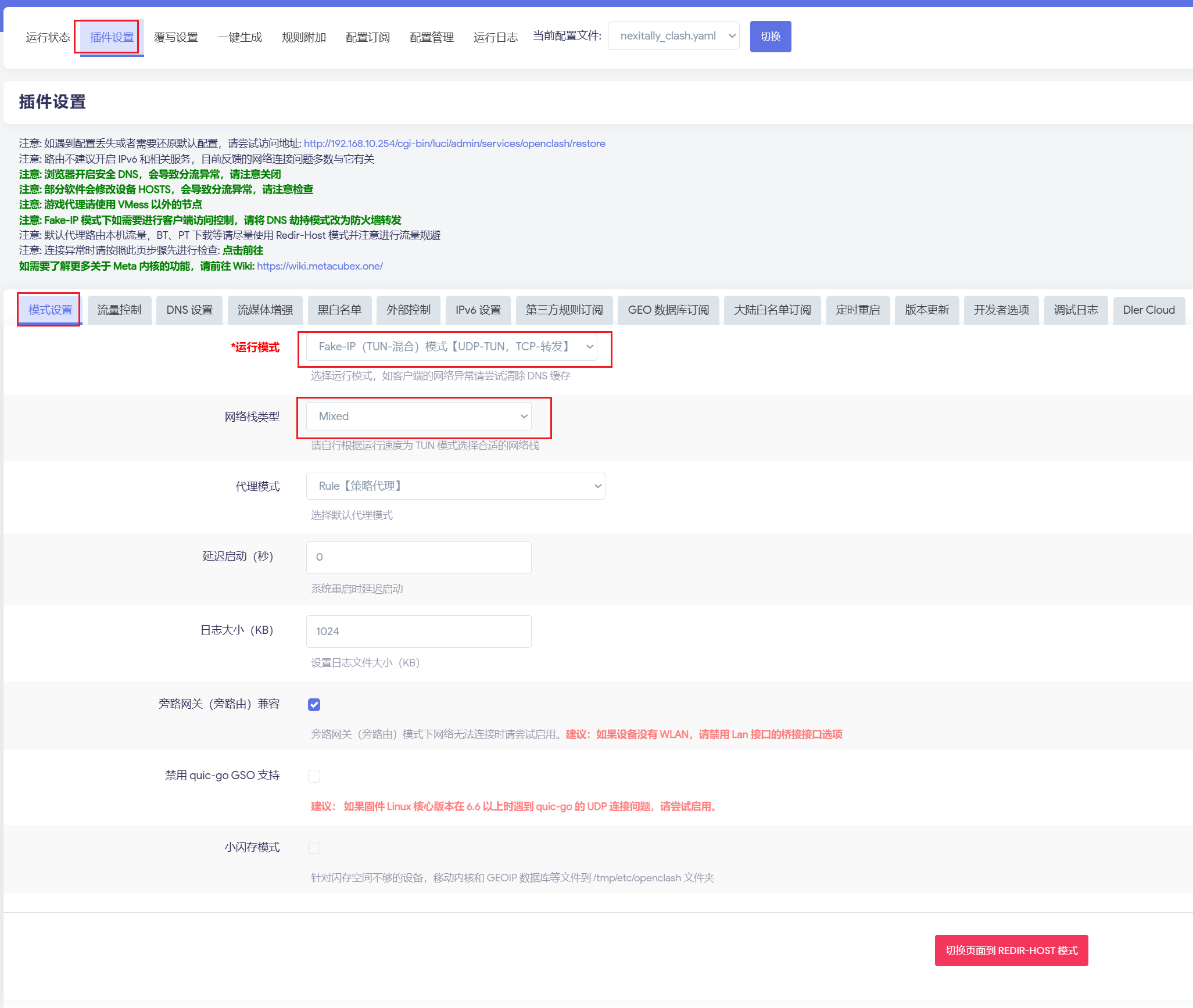
1\. 模式设置

<figure><img src="https://2331855688-files.gitbook.io/~/files/v0/b/gitbook-x-prod.appspot.com/o/spaces%2FO2AC57rbUFc12ou3APLo%2Fuploads%2FzVMHNbBxcDfbfTdr6FqV%2FSnipaste_2026-01-11_20-55-12.png?alt=media&#x26;token=320c88bc-cd37-4cd6-8271-94af23e6074d" alt=""><figcaption></figcaption></figure>

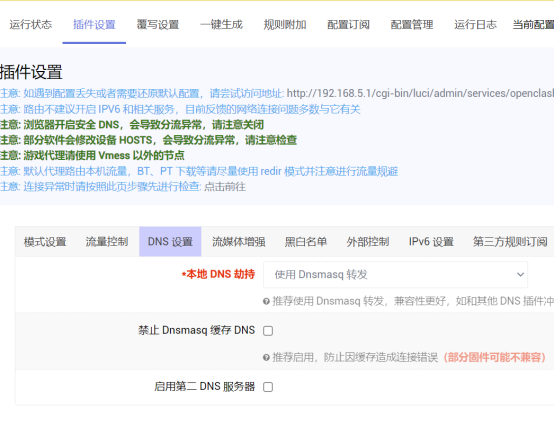
2\. DNS 设置

<figure><img src="https://2331855688-files.gitbook.io/~/files/v0/b/gitbook-x-prod.appspot.com/o/spaces%2FO2AC57rbUFc12ou3APLo%2Fuploads%2FGCEzO9lvSiEM8dJirPrP%2Fimage.png?alt=media&#x26;token=ba4a50e5-9cc6-498d-9b1d-e453a19f2057" alt=""><figcaption></figcaption></figure>

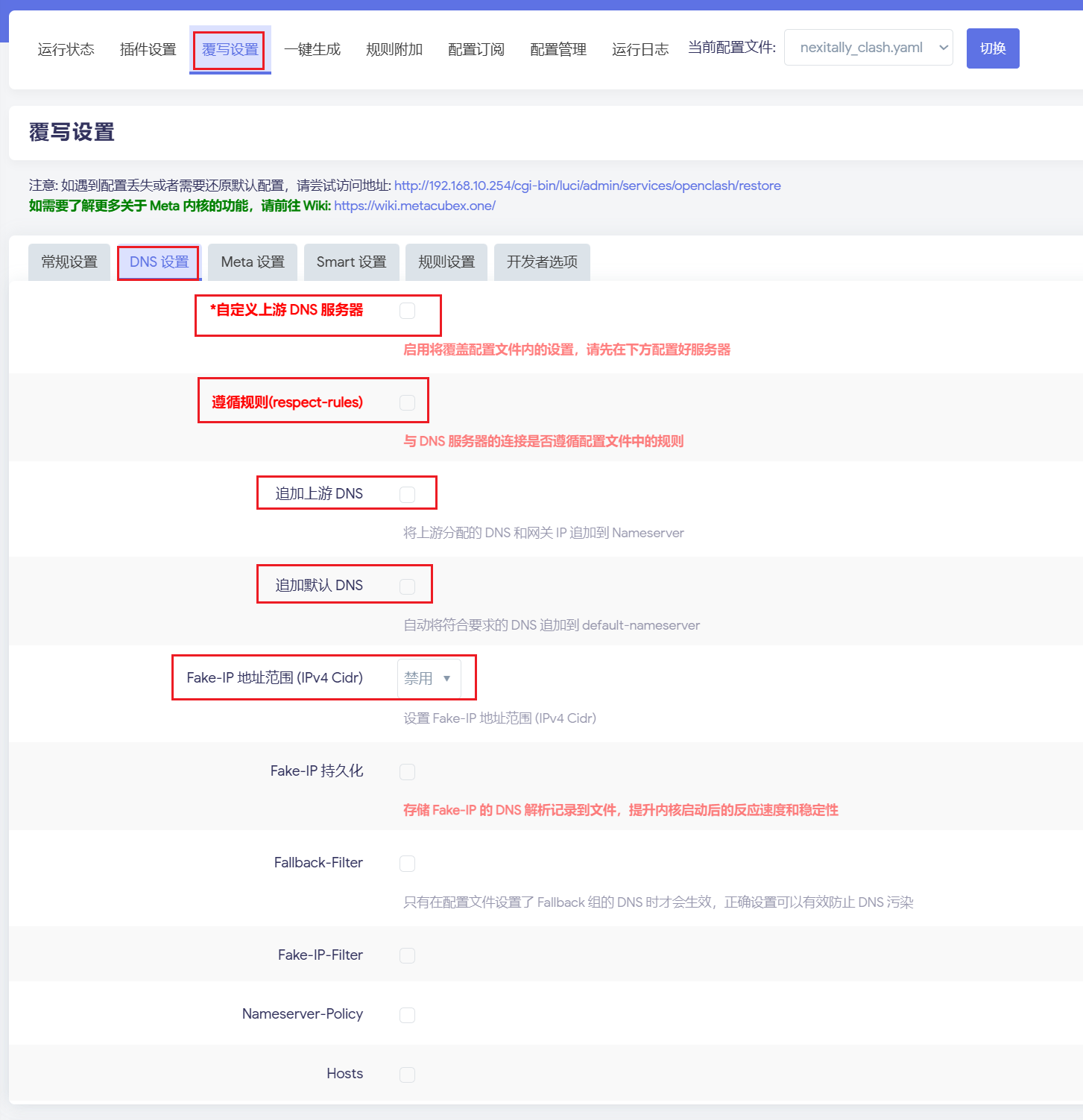
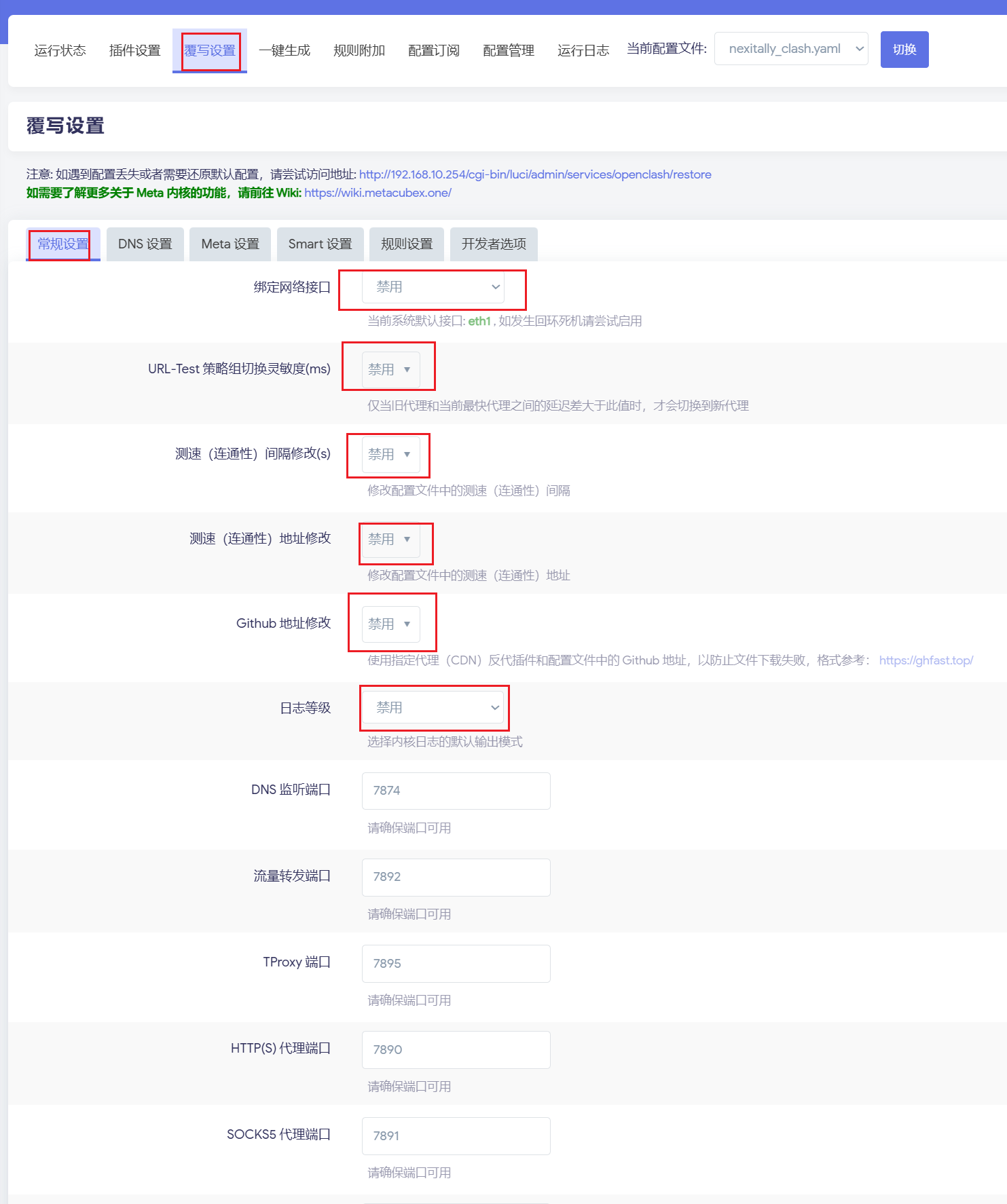
3\. 禁用覆写

下图红框内的选项需全部<mark style="color:red;">禁用</mark>

下面红框内的勾选项请<mark style="color:red;">不要选择</mark>

<figure><img src="https://2331855688-files.gitbook.io/~/files/v0/b/gitbook-x-prod.appspot.com/o/spaces%2FO2AC57rbUFc12ou3APLo%2Fuploads%2FTDXGa9PBD1phK4EqX2BI%2FSnipaste_2026-01-11_20-58-09.png?alt=media&#x26;token=a4441228-e36e-4995-ae22-57b4a84a759b" alt=""><figcaption></figcaption></figure>

<figure><img src="https://2331855688-files.gitbook.io/~/files/v0/b/gitbook-x-prod.appspot.com/o/spaces%2FO2AC57rbUFc12ou3APLo%2Fuploads%2FdwobAVoF0TpIzwxWErPN%2FSnipaste_2026-01-11_20-57-41.png?alt=media&#x26;token=94cad7fd-ea68-4885-8e00-337588bffe53" alt=""><figcaption></figcaption></figure>

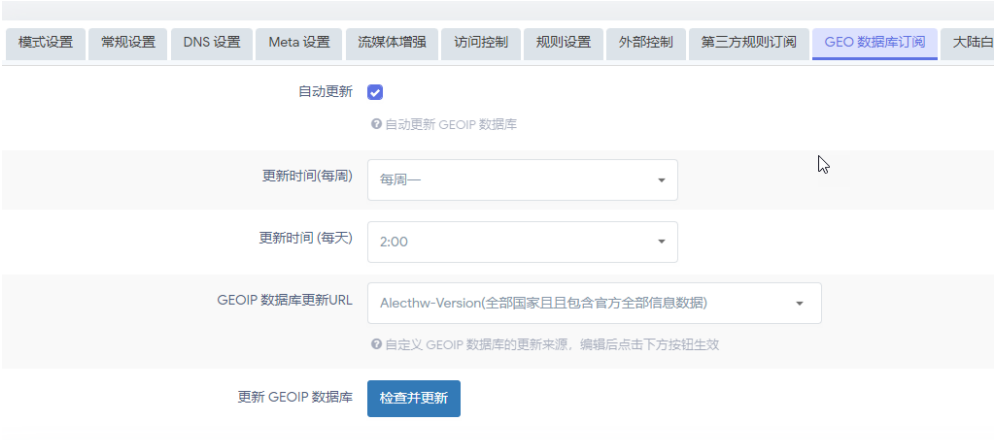
4\. GEO 数据库订阅

<figure><img src="https://2331855688-files.gitbook.io/~/files/v0/b/gitbook-x-prod.appspot.com/o/spaces%2FO2AC57rbUFc12ou3APLo%2Fuploads%2FolUut0V0wKmzbPtH2vWC%2Fimage.png?alt=media&#x26;token=221aba5d-e63a-4897-aa20-fdd6fd5a38dc" alt=""><figcaption></figcaption></figure>

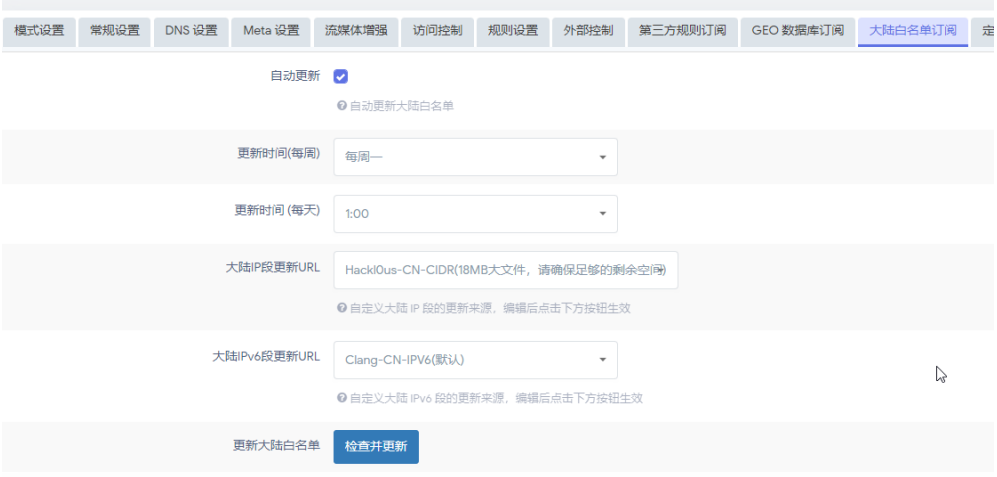
5\. 大陆白名单订阅

<figure><img src="https://2331855688-files.gitbook.io/~/files/v0/b/gitbook-x-prod.appspot.com/o/spaces%2FO2AC57rbUFc12ou3APLo%2Fuploads%2FThoIHGGkOinGwmw7H4dx%2Fimage.png?alt=media&#x26;token=67058224-5657-4318-a259-bbd54e7cfd3f" alt=""><figcaption></figcaption></figure>

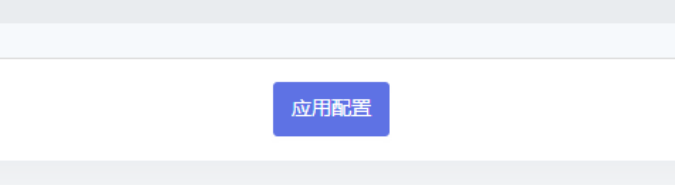
6\. 应用配置

<figure><img src="https://2331855688-files.gitbook.io/~/files/v0/b/gitbook-x-prod.appspot.com/o/spaces%2FO2AC57rbUFc12ou3APLo%2Fuploads%2FhwBjKjk612Rkqd1xuUOt%2Fimage.png?alt=media&#x26;token=56b449c9-7a5a-4696-961d-33ca7c5c25da" alt=""><figcaption></figcaption></figure>

### **三、 节点选择** <a href="#e4-b8-89-e3-80-81-e8-8a-82-e7-82-b9-e9-80-89-e6-8b-a9" id="e4-b8-89-e3-80-81-e8-8a-82-e7-82-b9-e9-80-89-e6-8b-a9"></a>

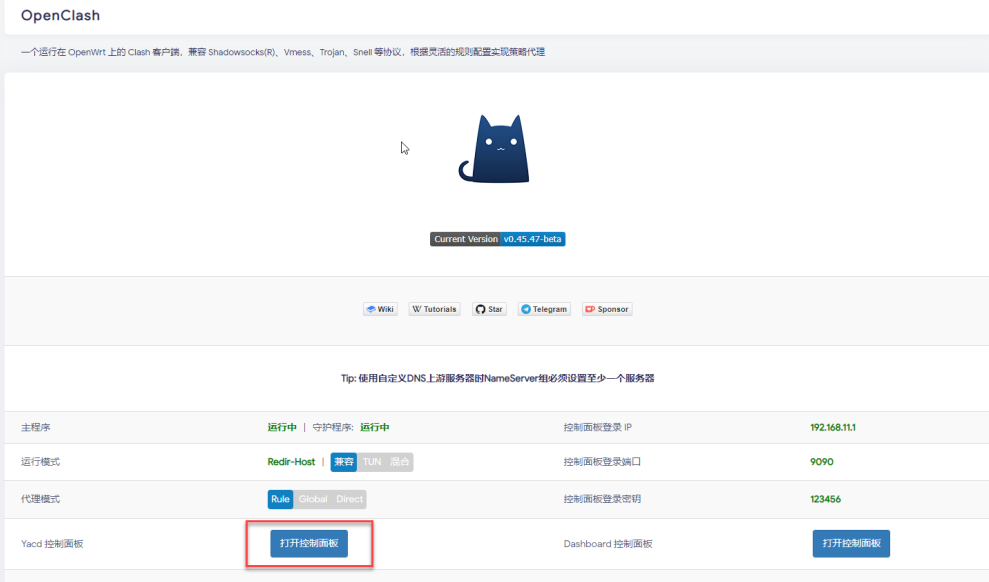
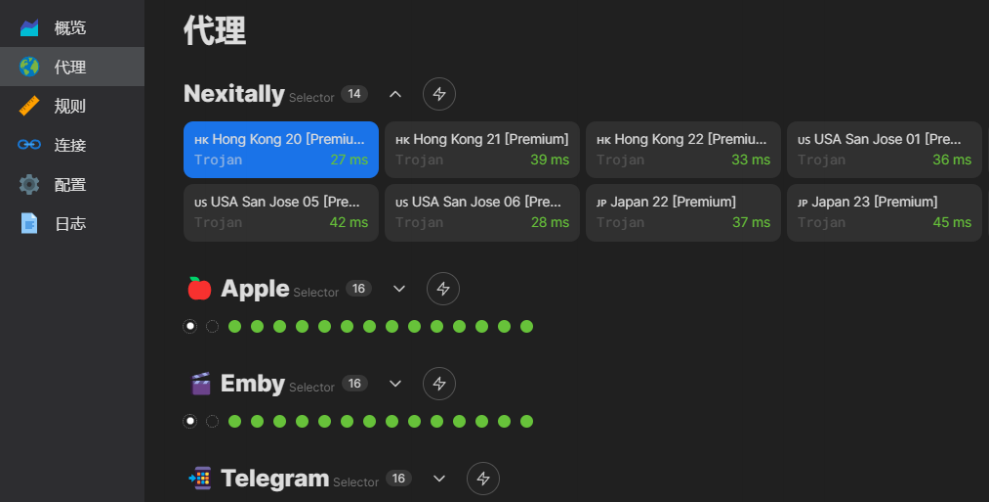
选择 Yacd 控制面板

<figure><img src="https://2331855688-files.gitbook.io/~/files/v0/b/gitbook-x-prod.appspot.com/o/spaces%2FO2AC57rbUFc12ou3APLo%2Fuploads%2FaYCiu9KovTorY6JrXP2h%2Fimage.png?alt=media&#x26;token=e2dff802-10b3-4931-a694-d0ee0923e478" alt=""><figcaption></figcaption></figure>

选择节点

<figure><img src="https://2331855688-files.gitbook.io/~/files/v0/b/gitbook-x-prod.appspot.com/o/spaces%2FO2AC57rbUFc12ou3APLo%2Fuploads%2FvvuzzEDoXkTtjEaLnEcR%2Fimage.png?alt=media&#x26;token=fe35744a-7e68-4bdb-bf4d-bac3474b1a86" alt=""><figcaption></figcaption></figure>

### **四、 起飞** <a href="#e5-9b-9b-e3-80-81-e8-b5-b7-e9-a3-9e" id="e5-9b-9b-e3-80-81-e8-b5-b7-e9-a3-9e"></a>

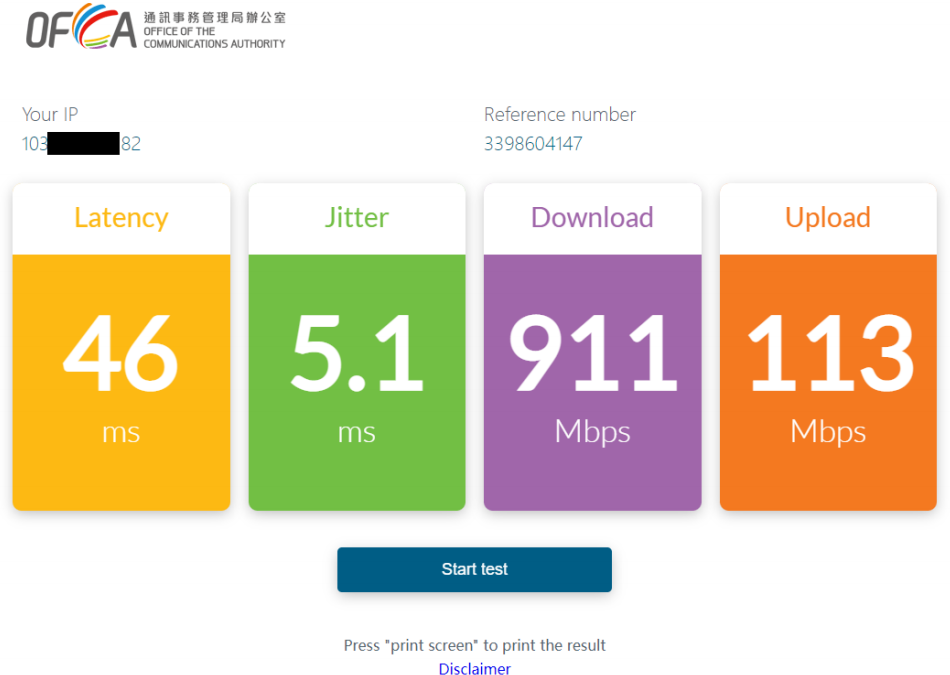
测速

<figure><img src="https://2331855688-files.gitbook.io/~/files/v0/b/gitbook-x-prod.appspot.com/o/spaces%2FO2AC57rbUFc12ou3APLo%2Fuploads%2FXpwABBCjRjypnvE8fzWH%2Fimage.png?alt=media&#x26;token=6f5eb948-8188-4e28-b879-5f4e452781eb" alt=""><figcaption></figcaption></figure>

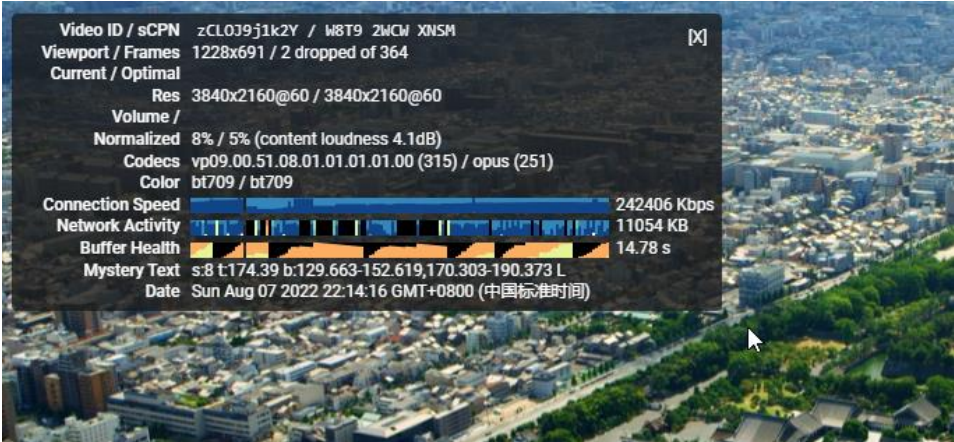
晚高峰油管

<figure><img src="https://2331855688-files.gitbook.io/~/files/v0/b/gitbook-x-prod.appspot.com/o/spaces%2FO2AC57rbUFc12ou3APLo%2Fuploads%2FzJg2pxhLd0VEtvzViSzO%2Fimage.png?alt=media&#x26;token=7c332949-544a-4e0f-b3db-9dd6c3dddb18" alt=""><figcaption></figcaption></figure>

### **五、其他** <a href="#e4-ba-94-e3-80-81-e5-85-b6-e4-bb-96" id="e4-ba-94-e3-80-81-e5-85-b6-e4-bb-96"></a>

1\. Openclash 固件更新

<figure><img src="https://2331855688-files.gitbook.io/~/files/v0/b/gitbook-x-prod.appspot.com/o/spaces%2FO2AC57rbUFc12ou3APLo%2Fuploads%2FZHDDbOc4U3wvU3qq8ajQ%2Fimage.png?alt=media&#x26;token=25c8a244-1d49-480a-a569-036e0217760b" alt=""><figcaption></figcaption></figure>

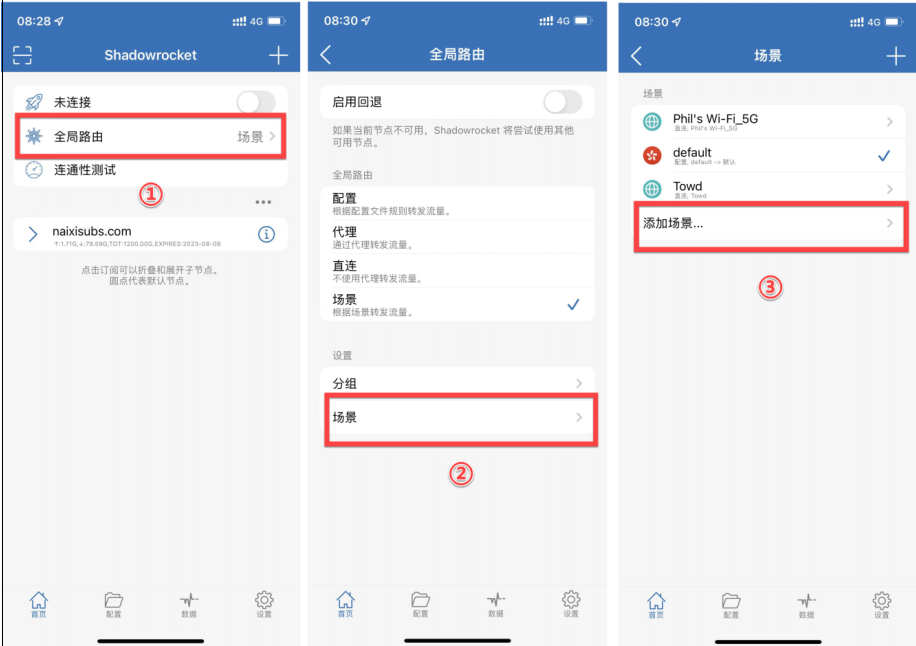
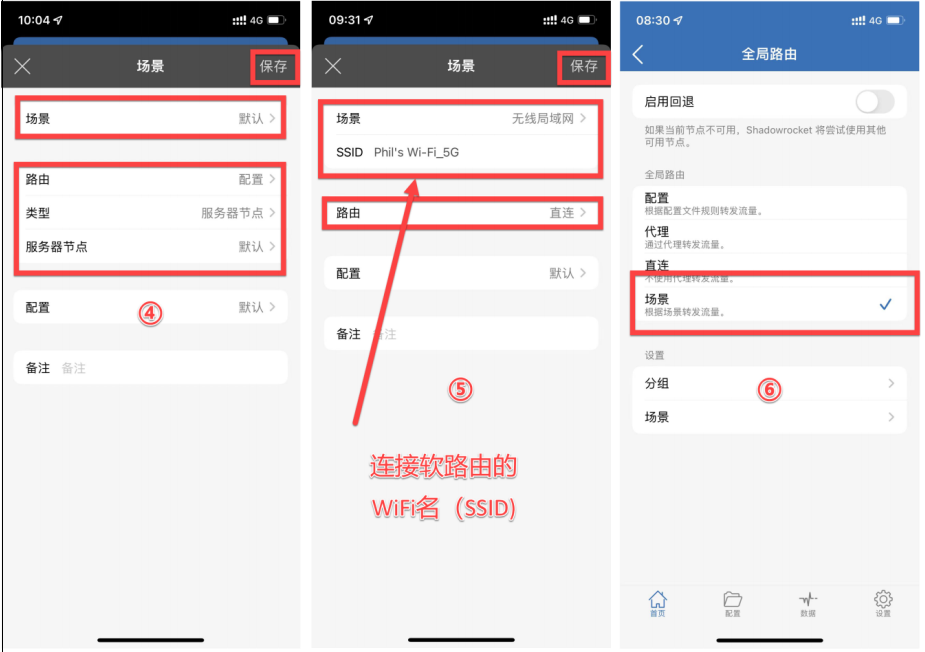
2\. 假如家里路由级已经解决了科学上网，那么手机等终端设备是没必要再重复开启代理的，不然速度会更慢，性 能开销也属浪费，但是当出了家门，连到公司 Wi-Fi，又或者在咖啡厅，那么又需要开启代理。OK，这个过程 完全是固定模式，有办法自动吗？YES。

A. Shadowrocket 自动切换

<figure><img src="https://2331855688-files.gitbook.io/~/files/v0/b/gitbook-x-prod.appspot.com/o/spaces%2FO2AC57rbUFc12ou3APLo%2Fuploads%2F8MiMKzymr3B9OuGnq6Cc%2Fimage.png?alt=media&#x26;token=bf73b0d1-d7b2-4195-8938-a7aa07d3b717" alt=""><figcaption></figcaption></figure>

<figure><img src="https://2331855688-files.gitbook.io/~/files/v0/b/gitbook-x-prod.appspot.com/o/spaces%2FO2AC57rbUFc12ou3APLo%2Fuploads%2FgC5O3YHUbwSDp1f6oiUP%2Fimage.png?alt=media&#x26;token=0dfc407d-53f5-4b6e-a247-a0e06b05f721" alt=""><figcaption></figcaption></figure>

B. Surge 自动切换（参考文档：<https://1991421.cn/2021/02/06/44d2c58d/）>

**配置 主配置文件，增加以下配置**

\[Script]\
script1 = type=event,event-name=network-changed,script-path=wifi-changed.js

**wifi-changed.js 脚本内容如下**

const WIFI\_DONT\_NEED\_PROXYS = \[“软路由连接的 WI-FI SSID”];\
const CURRENT\_WIFI\_SSID\_KEY = ‘current\_wifi\_ssid’;\
if (wifiChanged()) {\
const mode = WIFI\_DONT\_NEED\_PROXYS.includes($network.wifi.ssid)\
? ‘direct’\
: ‘rule’;\
$surge.setOutboundMode(mode);\
$notification.post(\
‘Surge’,\
\`Wi-Fi changed to ${$network.wifi.ssid || ‘cellular’}\`,\
\`use ${mode} mode\`\
);\
}\
function wifiChanged() {\
const currentWifiSSid = $persistentStore.read(CURRENT\_WIFI\_SSID\_KEY);\
const changed = currentWifiSSid !== $network.wifi.ssid;\
changed && $persistentStore.write($network.wifi.ssid,\
CURRENT\_WIFI\_SSID\_KEY);\
return changed;\
}\
$done();


---

# Agent Instructions: Querying This Documentation

If you need additional information that is not directly available in this page, you can query the documentation dynamically by asking a question.

Perform an HTTP GET request on the current page URL with the `ask` query parameter:

```
GET https://nexitally-1.gitbook.io/nexitally-wen-dang-zhong-xin/nexitally-wen-dang-dao-hang/openclash-she-zhi.md?ask=<question>
```

The question should be specific, self-contained, and written in natural language.
The response will contain a direct answer to the question and relevant excerpts and sources from the documentation.

Use this mechanism when the answer is not explicitly present in the current page, you need clarification or additional context, or you want to retrieve related documentation sections.